Mac app · for people who run more than one product
See which apps make money. And which ones just cost you.
Put revenue next to hosting, API and subscription costs. MarginDeck shows the profit of each product, month by month.
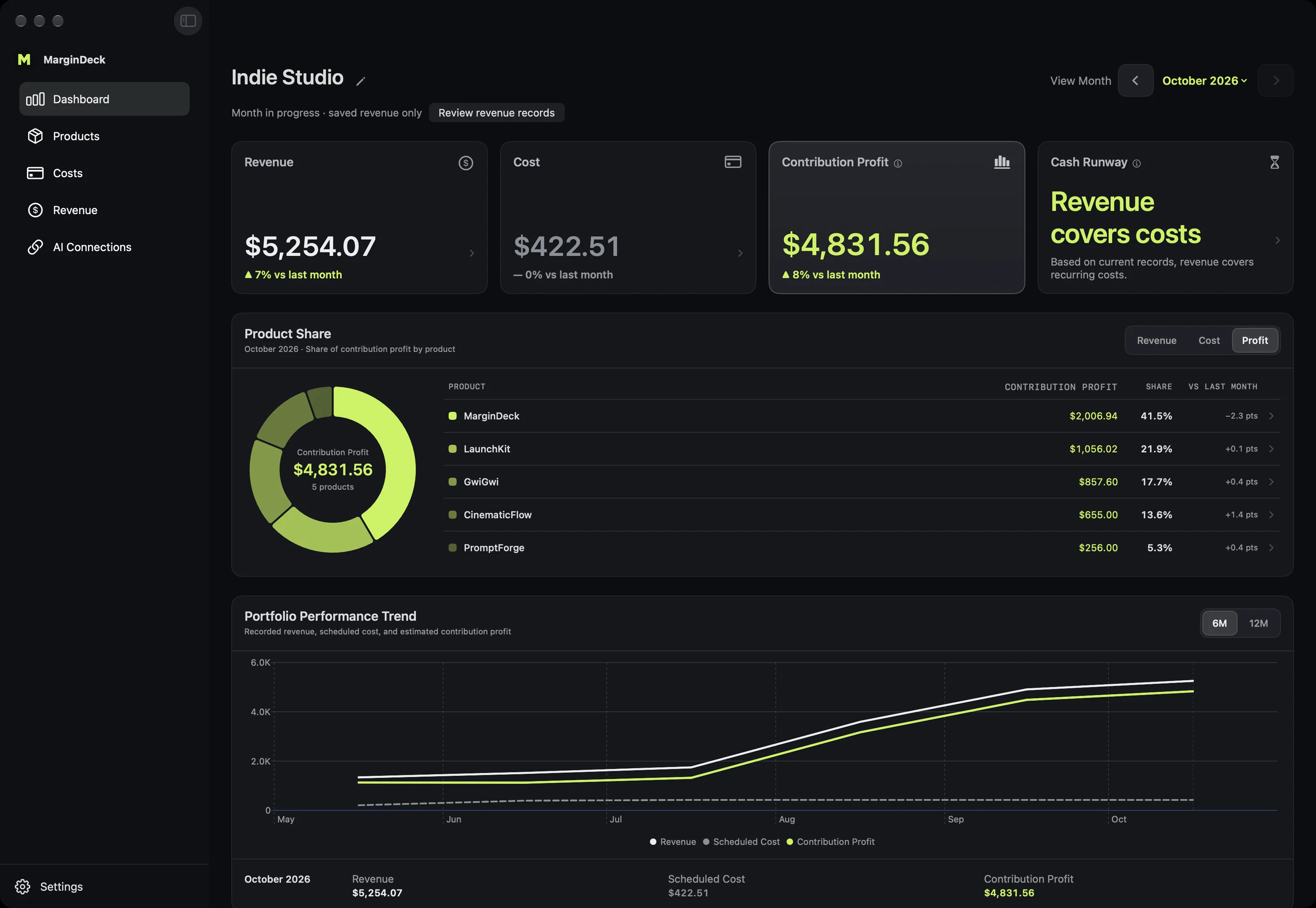
Product comparison · October 2026
Example data| Product | Contribution profit | Contribution profit amount | Revenue | Cost | Margin |
|---|---|---|---|---|---|
| MarginDeck | $1,766.94 | $1,900.00 | $133.06 | 93% | |
| LaunchKit | $1,056.02 | $1,120.22 | $64.20 | 94% | |
| GwiGwi | $857.60 | $913.86 | $56.26 | 94% | |
| CinematicFlow | $655.00 | $800.00 | $145.00 | 82% | |
| PromptForge | $256.00 | $280.00 | $24.00 | 91% |
01Record
Revenue and costs in one place. Typed in or synced.
Enter revenue by hand, pull monthly totals from App Store Connect, RevenueCat and Stripe with read-only access, or drag in an App Store sales report. Costs can be monthly, yearly or one-time, in any supported currency.
03Compare
Profit per product, month by month.
Revenue minus the costs assigned to each product. See which one carries the rest, and which one has never paid for itself. A ring on the Dashboard shows each product's share of profit, revenue or costs.
04Upcoming
See the next charge before it lands.
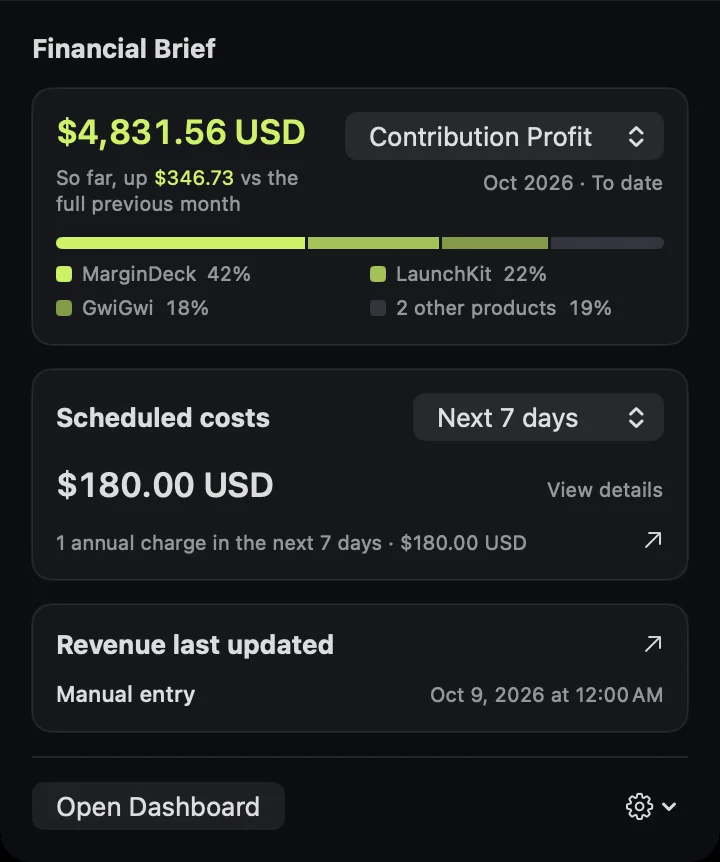
Upcoming costs for the next 30 days or 12 months, with optional reminders. The menu bar shows this month's profit, your top products' shares and the next charges without opening the app.
05Plan
Price out the next product before you build it.
Pick a start month and 1 to 24 months. Reuse part of costs you already pay, add new ones, and see the total and the monthly average. Plans stay apart from your real records.
06Ask
Ask Claude or Codex. Off until you turn it on.
Connect an AI app on your Mac to ask which product earns the most, or to log a cost for you. You decide whether it can read, add, or both.
Local first
Your numbers stay on your Mac.
- No MarginDeck accountRecords live in a local database
- Read-only revenue syncApp Store Connect, RevenueCat and Stripe keys stay in Keychain
- AI connections off by defaultYou choose what an AI app can see
- Analytics off by defaultNever includes business records
Start free. Buy Pro once.
Free
$0
One product, with revenue sync, costs, the dashboard and the menu bar brief. New product plans don't count toward the limit.
Pro Lifetime · early bird
$14.99 one time
Unlimited products, side-by-side comparison and shared-cost splits. No subscription.
US App Store price; the App Store shows your local price. Pricing details
Free calculators
No sign-up. Nothing leaves your browser.
Guides
Questions
What is MarginDeck?
A Mac app that puts revenue next to costs for each product you run and shows the profit of each one, month by month. It is for planning decisions, not accounting or tax.
Where is my data stored?
In a local database on your Mac. There is no MarginDeck account, and no MarginDeck server holds your records.
Which revenue sources does it support?
Manual entry from any source, read-only monthly totals from App Store Connect, RevenueCat and Stripe, and App Store monthly sales report files. Reports from other platforms can go through Claude or Codex. Stripe uses a restricted key; MarginDeck will not accept a full-access secret key.
Can Claude or Codex work with it?
Yes, once you turn on AI connections. The AI app runs on your Mac and you choose whether it can read records, add them, or both. Its AI provider may process what it reads. Privacy policy
What does Pro add?
More than one product, side-by-side comparison and shared-cost splits. It is a one-time purchase, with no subscription.